Datrylo Accounting. Every ledger. Every report. Every close.
Run your full accounting cycle in one connected workspace: chart of accounts, journals, receivables and payables, bank reconciliation, 15 financial reports, assets, budgets, multi-company accounting and month-end and year-end closing. Move from a financial statement to the entries and business documents behind it.
Explore Datrylo in action. Select an image for a closer look.
Explore the full Accounting workspace
Financial reports: 15 views of your business
Give accountants, finance managers and business owners the statements they need to understand performance, explain balances and investigate exceptions.
- Profit and Loss: income, expenses and net profit for the selected period.
- Balance Sheet: assets, liabilities, equity and current-year earnings, with a balance check.
- Trial Balance: opening balances, period debits and credits, and closing balances by account.
- General Ledger: account movements, references, partners and running balances, linked to individual journal entries.
- Partner Ledger: customer and supplier activity, opening balances and transaction detail.
- Aged Receivable and Aged Payable: outstanding amounts grouped into configurable aging buckets.
- Cash Flow Statement: direct or indirect presentation of operating, investing and financing activity, with opening and closing cash.
- Executive Summary: profitability, cash position, working capital and financial ratios in one management view.
- Customer Statement and Vendor Statement: account activity and balances for conversations with customers and suppliers.
- Analytic Balance: financial activity by analytic account or plan for department and project reporting.
- Deferred Revenue and Deferred Expense: recognition schedules showing amounts before, within and after the reporting period.
- Bank Reconciliation Report: the bridge between statement balances, outstanding receipts and payments, and the ledger balance.
Reporting that goes beyond a static statement
Explore the numbers, compare performance and prepare the reporting pack your team actually uses.
- Filter reports by dates, companies, journals, accounts, partners and analytic dimensions where applicable.
- Compare custom or successive periods; pivot Profit and Loss, Balance Sheet and Trial Balance by analytic account or plan.
- Drill into an account, transaction or scoped report cell to inspect the underlying journal items.
- Export financial reports to PDF and XLSX, and save personal filter sets for repeat reviews.
- Build custom reports with account-based lines, calculations, formulas and subtotals.
- Schedule report delivery through configured email or chat integrations, and prepare month-by-month projections for supported aggregate reports.
- Keep report-execution history with the user, time and options used to produce an output.
Chart of Accounts (CoA): the structure behind every number
Design an account structure that matches how your business operates and how your finance team reports.
- Organise account codes, names, types and account groups across assets, liabilities, equity, income and expenses.
- Maintain receivable, payable, bank, cash, tax and control accounts, with reconciliation settings where needed.
- Configure default taxes and account currencies, and retire accounts that should no longer receive new entries.
- Establish opening balances and connect account mappings to sales, purchasing, products and fiscal positions.
- Use analytic accounts, plans and distributions to add a department, project or cost-centre view alongside the general ledger.
- Map subsidiary accounts into a group chart for consolidated reporting.
Journals and journal entries: control the books
Keep daily transactions, adjustments and period-end work in an organised, traceable ledger.
- Maintain sales, purchase, bank, cash and miscellaneous journals with their own configuration and document sequences.
- Create balanced debit and credit entries, review journal items and follow references back to invoices, bills and payments.
- Work through draft and posted states, reverse entries when a correction is needed, and retain the original transaction history.
- Record accruals, adjustments, deferrals, depreciation and foreign-currency revaluation through the appropriate accounting workflows.
- Apply approval policies to journal entries and supplier bills before posting.
- Use posting dates and period locks to control which accounting periods remain open.
Month-end and year-end closing
Bring the close into a tracked workflow, from reviewing the trial balance to approving the final period lock.
- Create reusable close checklists for a defined period, with assigned tasks, required steps and completion evidence.
- Reconcile bank, receivable and payable balances; review suspense accounts and investigate draft entries before closing.
- Include depreciation, deferred revenue and expenses, accruals, currency revaluation and intercompany checks in the close process.
- Review the year’s Profit and Loss, the closing Balance Sheet, current-year earnings and supporting ledgers together.
- Record preparer, reviewer and final approver sign-offs, with separate people responsible for each stage.
- Run automated checks for draft entries, exceptional unbalanced postings and open bank or cash suspense.
- Choose sign-off only or advance the company-wide lock through the approved period end. Record reasons and history when a manager reopens a close for adjustments.
Year-end checklists and closing adjustments are configured around your fiscal year and accounting policies, including the treatment of earnings and opening balances for the next year.
Customer invoices and accounts receivable
Connect invoicing to collections and the customer ledger.
- Create and post customer invoices, credit notes and refunds, with payment terms, due dates, taxes and multiple currencies.
- Link invoices to sales activity and trace every posted amount into its accounting entries.
- Record full or partial receipts and reconcile payments against outstanding invoices.
- Review customer statements, partner ledgers and receivable aging to identify what is due and overdue.
- Set customer credit limits with warning or blocking policies and documented manager overrides.
Supplier bills and accounts payable
Manage what you owe, when it is due and how it is approved.
- Record supplier bills and credit notes, connect purchasing documents and follow the payable ledger.
- Use recurring bill checks and unusual-bill alerts to review potential duplicates and unexpected changes.
- Route bills through approval steps based on company, document type and amount.
- Review supplier statements and payable aging before preparing payments.
- Settle bills fully or partially, individually or through controlled payment batches.
Banking, statement imports and reconciliation
Move from imported bank activity to explained, reconciled balances.
- Import CSV, OFX, QIF, CAMT.053 and MT940, with per-bank CSV column profiles.
- Review import history, repeated imports and possible duplicates across statement sources.
- Match statement lines to accounting entries using suggestions based on amount, date, partner, reference and previous matches.
- Configure reconciliation rules, review ambiguous candidates and confirm the correct match.
- Work through outstanding receipts, outstanding payments and reconciliation exceptions.
- Retain a record of matching decisions, including manual overrides, and use the bank reconciliation report to explain differences.
Payments, cheques and post-dated cheques
Coordinate outgoing payments and incoming receipts with clear review steps.
- Build customer receipt or supplier payment batches, including partial settlements and supported mixed-currency payments.
- Review a payment batch and its CSV preview before posting, with separate managers confirming and posting it.
- Print cheques using configured layouts and manage cheque books and serial numbers.
- Track issued and received post-dated cheques through presentation, clearance, bounce and replacement.
- Keep cheque-transit and outstanding-payment accounting connected to the ordinary ledger and reconciliation process.
Collections and credit control
Turn overdue balances into an organised follow-up process.
- Manage overdue customer cases in a collections workbench and prioritise the accounts needing attention.
- Configure reminder stages, schedule call activities and track promises to pay.
- Escalate broken promises and apply configured late-fee workflows where appropriate.
- Review current credit exposure and enforce company or customer-specific limits before invoice posting.
- Record the reason when an authorised manager overrides a credit restriction.
Budgets, cost centres and cash forecasting
Connect spending plans to actual activity and upcoming commitments.
- Prepare account-based budgets with analytic dimensions for departments, projects and cost centres.
- Keep budget versions and revised forecasts while preserving the original baseline.
- Compare planned amounts, actual activity and purchase-order commitments; review the remaining available budget.
- Configure warning or blocking policies for purchase commitments that exceed budget.
- Use flexible budgets, activity drivers and price or efficiency variance analysis where configured.
- Forecast cash by week or month using bank balances, open invoices, supplier bills and expected payments.
Fixed assets, depreciation and leases
Manage an asset from acquisition through depreciation, impairment and disposal.
- Maintain the fixed asset register, asset categories, acquisition values and useful lives.
- Generate depreciation schedules using supported methods, including straight-line and reducing-balance approaches, and post the related entries.
- Track assets under construction, transfers into use, disposals and resulting gains or losses.
- Record impairment and supported reversals with the relevant accounting controls.
- Manage right-of-use assets, lease liabilities and amortisation schedules, including lease modifications and termination.
- Keep deferred expense and revenue schedules connected to their recognition entries and reports.
Revenue recognition and deferred income
Connect customer contracts to the timing of revenue in the accounts.
- Define contracts and performance obligations, and allocate the transaction price using standalone selling prices.
- Recognise revenue at a point in time or over time using a documented measurement method.
- Track contract assets, contract liabilities and the journal entries created by recognition.
- Review deferred revenue schedules and the amounts recognised in each reporting period.
Multi-currency accounting and revaluation
Keep transaction currency and company currency visible throughout the accounting cycle.
- Work with foreign-currency invoices, bills, payments and account balances.
- Schedule exchange-rate updates from configured providers.
- Revalue open monetary foreign-currency balances at period end and post the resulting unrealised gains or losses.
- Review revaluation entries and use controlled reversal dates where required.
- Translate member-company figures into the reporting currency during consolidation.
Multi-company, intercompany and consolidation
Run separate company books and prepare a connected group view.
- Maintain company-specific accounting with access limited to authorised companies.
- Create linked intercompany invoice and bill counterparts, with review queues and mismatch checks.
- Coordinate intercompany sales and purchase orders through linked draft counterparts and controlled fulfilment.
- Map subsidiary accounts into the group structure and translate balances into a common reporting currency.
- Prepare consolidated trial balances, elimination entries and ownership-based consolidation calculations.
- Trace consolidated figures back to member-company balances, currency translation and elimination adjustments.
Taxes, fiscal positions and analytic accounting
Connect tax and management dimensions to the original business transaction.
- Configure sales and purchase taxes, tax groups and the accounts used by those taxes.
- Use fiscal positions to map taxes and accounts for the relevant customer or supplier scenario.
- Review tax-related journal items alongside the underlying invoices and bills.
- Allocate income and costs across analytic plans, accounts and distributions for management reporting.
Country-specific statutory reports, electronic invoicing and provider connections depend on the selected localisation and implementation scope.
Approvals, permissions and audit history
Give each finance role the tools and controls its work requires.
- Use Accounting User, Manager and read-only Auditor roles, alongside company access rules.
- Configure multi-step approvals with amount bands, named approvers, groups and required approval counts.
- Track approval history and request renewed approval when a material change requires it.
- Keep posting controls, payment review and close sign-off within the relevant workflow.
- Review the recorded history of approvals, reports, reconciliation decisions and period closing.
See the complete accounting cycle in a demo
Walk through your chart of accounts, a posted journal, financial reports, bank reconciliation and a year-end close. Then explore the assets, budgets, currencies and company structure that matter to your finance team.
Explore the connected workflow
Clear invoices. A clearer view of what is owed.
Create and post customer invoices, record payments and follow outstanding balances. Datrylo Invoicing connects finance to the customer and sales records behind each transaction.
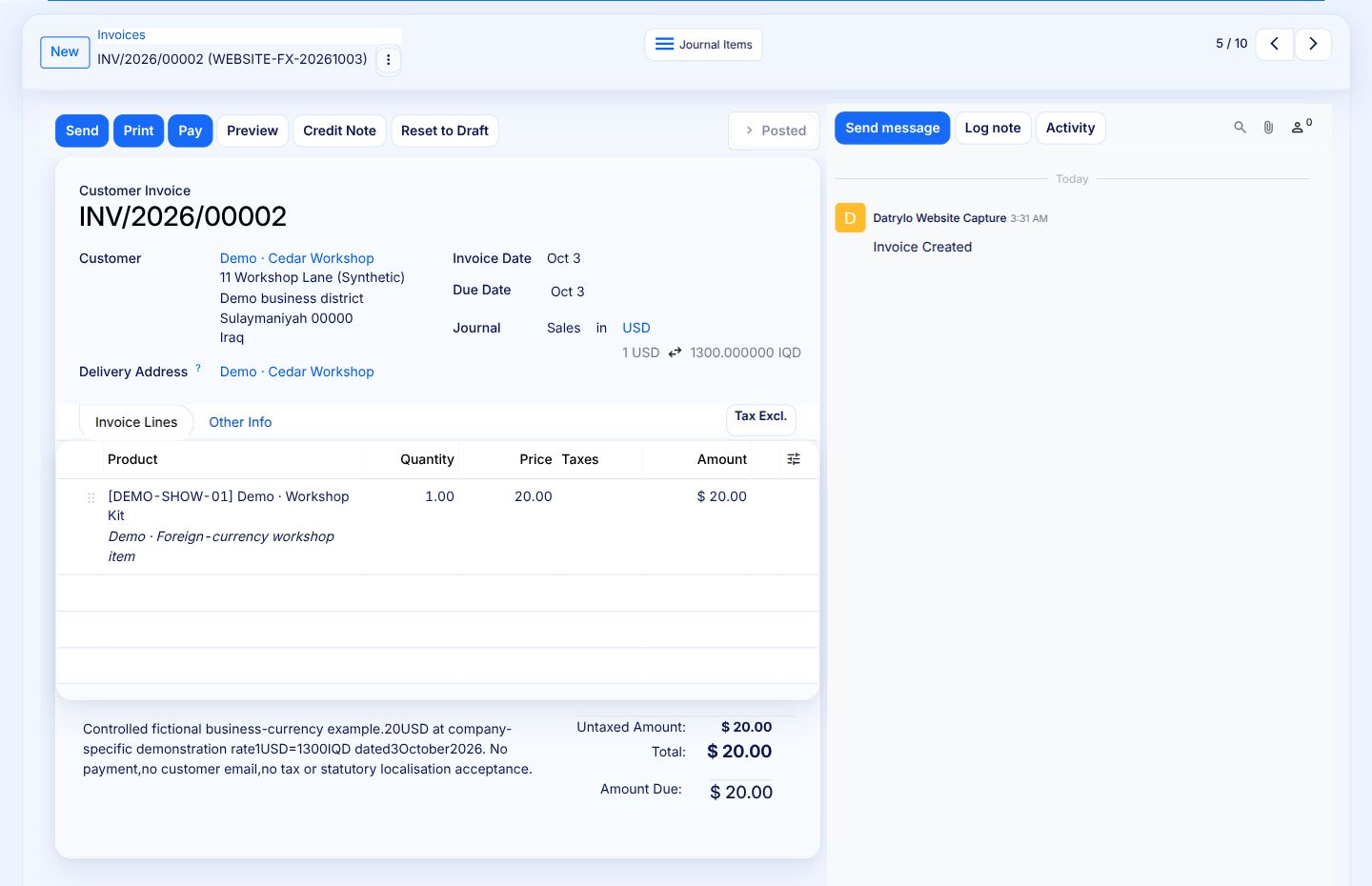
A posted invoice reconciles to its journal
Follow a foreign-currency invoice from posting to balanced journal entries and an account-level breakdown.
1 · Posted source invoice
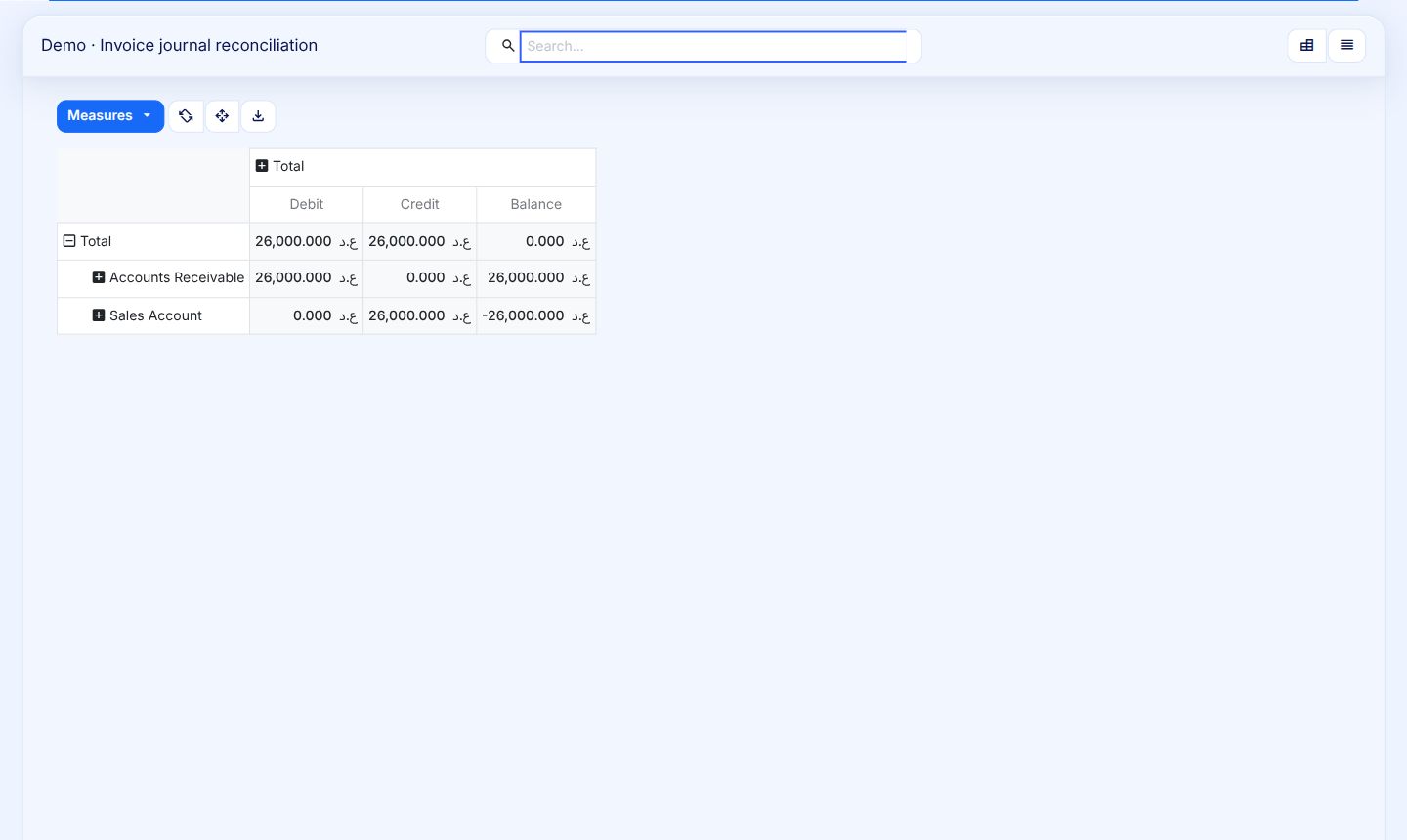
This example posts a USD 20 invoice at an exchange rate of IQD 1,300 per dollar, giving a company-currency value of IQD 26,000.
2 · Linked journal entries
Trace the invoice to its receivable and sales entries, with the original currency amount visible alongside the company-currency value.
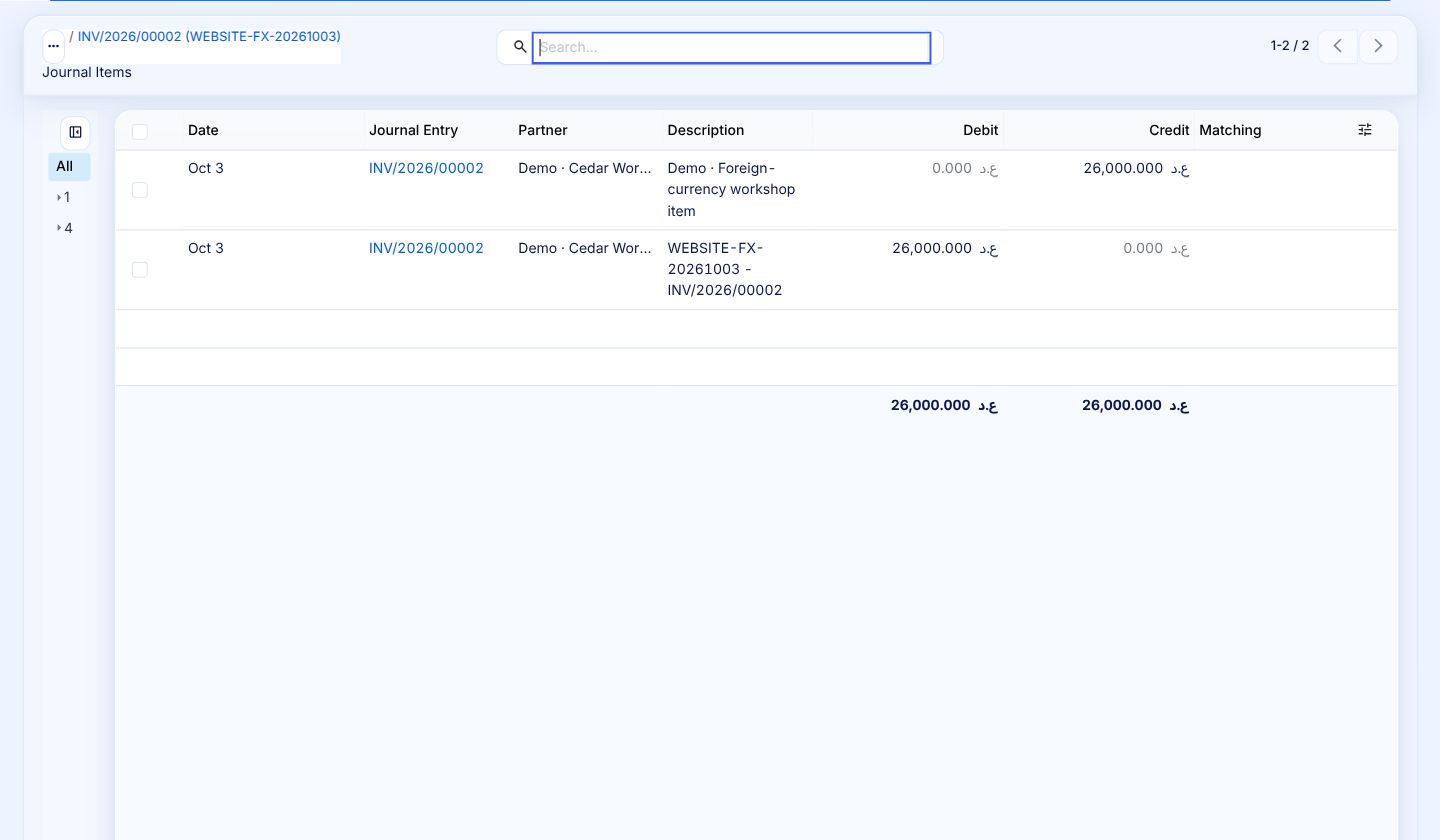
3 · Reconciliation to the source
Group journal items by account to understand how a transaction affects the books. Here, IQD 26,000 in debits matches IQD 26,000 in credits.