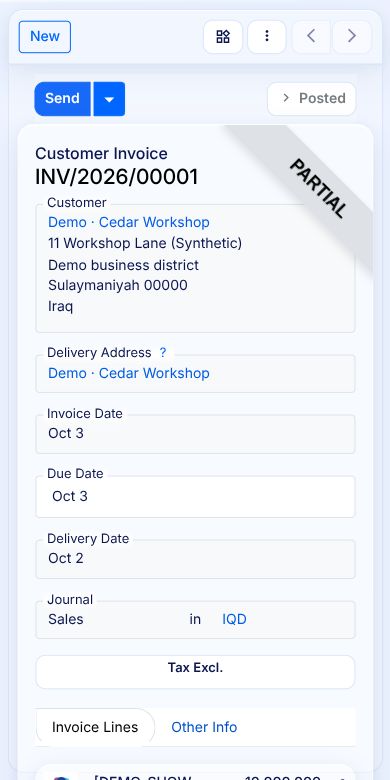
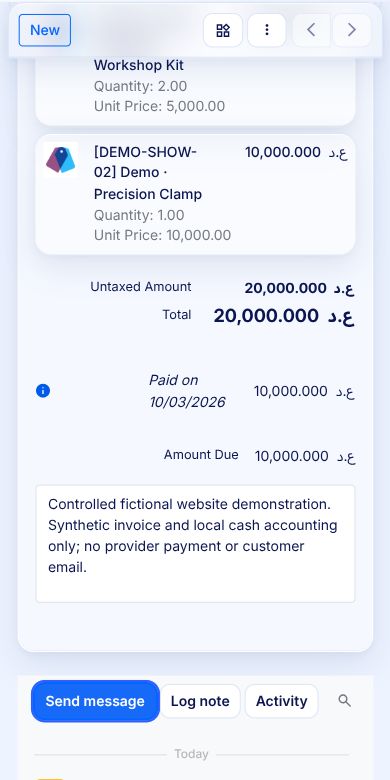
Datrylo on a mobile browser
Follow one existing invoice from its identity and line cards to the paid and remaining amounts. Use the copyable task sheet to compare the same result on your device and permitted role.
A real phone task: inspect an invoice balance
Follow one existing invoice from its identity and line cards to the paid and remaining amounts. Use the copyable task sheet to compare the same result on your device and permitted role.
A real phone task: inspect an invoice balance| Workflow step | What you can see |
|---|
| Task and role | Ordinary permitted invoice reader: inspect customer, lines, payment and remaining balance |
|---|
| Expected result | Same INV/2026/00001; 20,000 total; 10,000 still due; no change to record |
|---|
| Observed device/layout | Online phone browser; line cards and readable balance; page scrollWidth equals viewport width |
|---|
| Retest on your equipment | Record browser/device, language, role, connection, keyboard, action, evidence and exceptions; offline/device integrations are separate acceptance items |
|---|
1 · Open the same invoice on a phone
The actual phone browser renders INV/2026/00001 as Posted and Partial with Demo Cedar Workshop and its addresses. The desktop table becomes line-item cards; this is the same invoice, not a separate mobile mock-up.
2 · Read the amount still due
Scroll to the native payment area: 20,000 IQD total, a 10,000 IQD example cash entry dated 3 October 2026, and 10,000 IQD Amount Due. Reading this balance caused no payment or customer message.